
Ableton’s everyday sampler
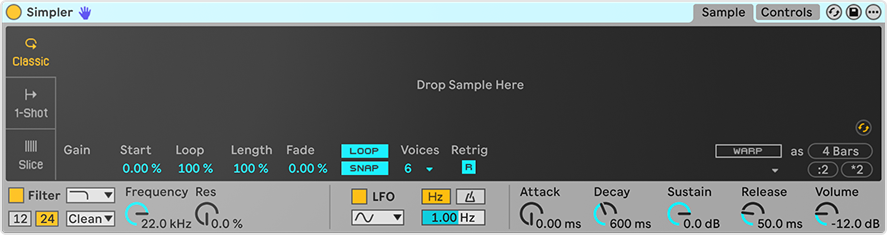
Simpler is the sampler most Live users reach for first, and for good reason. Drop any audio onto it and you can play it straight away. It plays a single sample but has three distinct modes. Classic mode plays the sample melodically across the keyboard, with looping. One-Shot mode plays each hit from start to finish, ideal for drums and vocal chops. Slice mode cuts a loop into pieces by transient, beat, region or by hand, so each slice can be played from its own key. Because it uses Live’s warping, samples can follow your project tempo without changing pitch. Around that sits a simple synth: a filter, LFO and envelopes, so you can shape a sample as freely as an oscillator. It’s especially good for chopping breaks, flipping vocal phrases and turning field recordings into instruments. Simpler is included in all editions of Live.
Features
Three playback modes: Classic, One-Shot and Slice
Slicing by transient, beat, region or manual markers
Warping to keep samples in time with your project
Loop with crossfade in Classic mode
Filter with multiple modes and analogue-modelled circuit types
LFO that can be synced to tempo, routable to filter, pitch, pan and volume
Amplitude, filter and pitch envelopes
Voices, glide, spread and retrigger controls
Slice to Drum Rack for building kits from a loop
Crop, reverse and warp-as-new-sample tools
Similar sample swapping to cycle through sounds that resemble the loaded one
MPE support for expressive playing
Great for
Chopping drum breaks
Vocal chops
Playable field recordings
Quick melodic sampling
Lo-fi textures
Related articles
Sampler · Drum Sampler · Impulse · Drum Rack · Auto Filter · Grain Delay