
Making Music in Key
Tuning your track to a musical key is one of the simplest ways to improve how it sounds. When your kick, bass and melodic parts agree on the same notes, the bass sounds tighter, chords sit cleanly over the top and the whole mix feels more deliberate. This tutorial explains musical keys and how to tune your track to one in Ableton Live. First up, let’s go over some music theory:
What is a musical key?
A key is a series of musical notes within an octave that work harmoniously together. It is made up of a root note and a selection of other notes that complement it.
The European (Western) scale
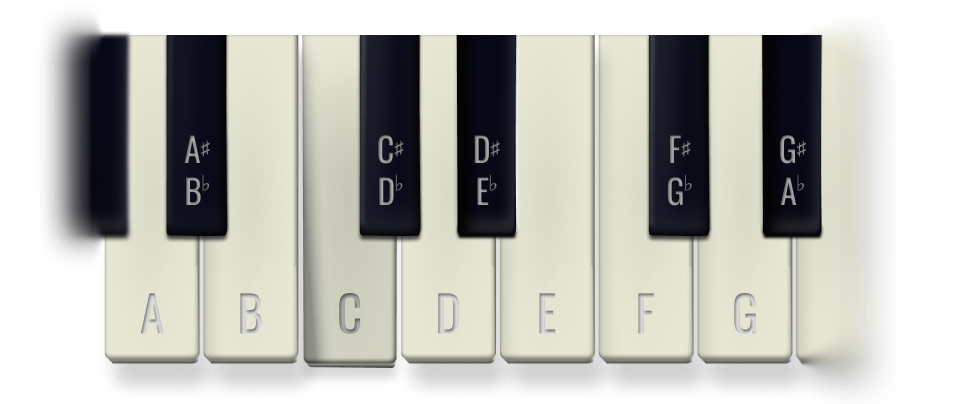
Throughout history, different cultures have created their own approaches to musical scales, but most modern music (including almost everything made in Ableton) uses the European / Western scale, which is a 12-tone equal temperament. It divides every octave into 12 equal steps called semitones. Each semitone / note is named after a letter from A to G, with intervals described as sharp (#), or flat (b), depending on the scale.
Major and Minor Keys
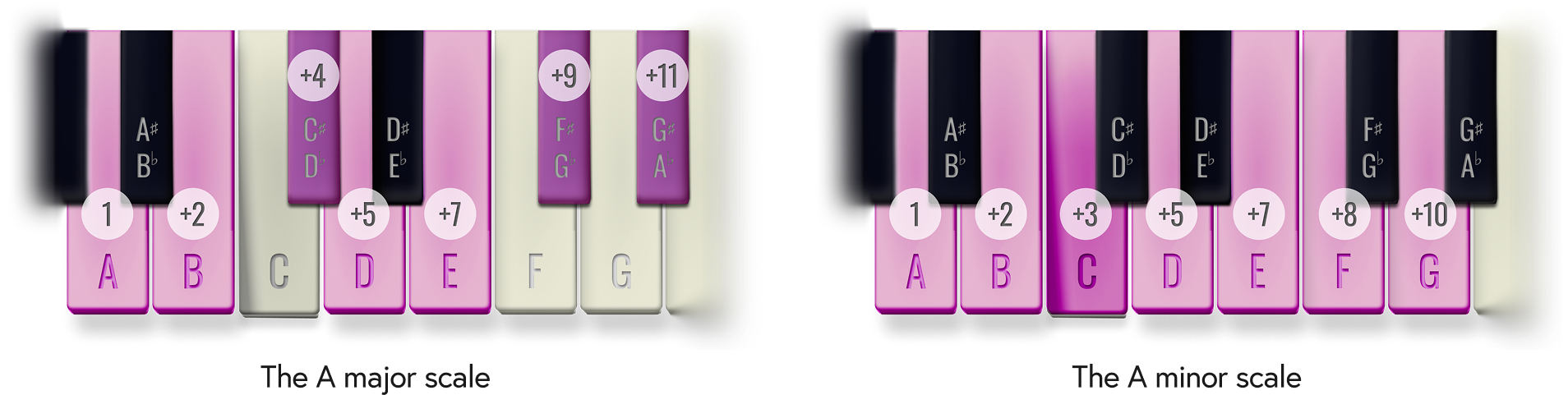
A scale uses seven of the 12 notes in an octave, following a fixed pattern of steps. A whole step jumps two semitones, skipping the note in between. A half step moves one semitone, to the very next note. Major keys use the notes pitched at two, four, five, seven, nine and 11 semitones higher than the root note. Minor keys use the notes pitched at two, three, five, seven, eight and 10 semitones higher than the root note. These differing patterns tend to make major scales sound bright and positive, whilst minor keys feel darker and more tense - perfect for techno!
Fine Tuning
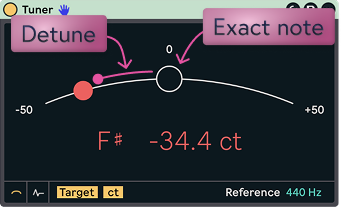
Each semitone is split again into 100 cents. One cent is 1/100th of a semitone. Adjusting sounds at this level of precision allows you to correct slightly out-of-tune sounds and ensure they hit a note accurately. Tracks sound much cleaner when each layer is pitched correctly.
The root note
This is the foundational / bottom note a key and the one your track gravitates back to. Keys are named after the root note, for example; in F minor, the root note is F. In electronic music the root is usually the note your bassline returns to, and the note your kick should be tuned to.
What a key means for your track
In a track, the key acts as a template. When every layer uses the same notes, from the kick's pitch to the vocal, they sound settled together and the track feels like it has a centre.
Notes outside the key create tension. Used deliberately, that tension adds interest; by accident, it sounds like a clash, and nowhere is that more obvious than in the low end.
How should I choose a key?
There's no "correct" key, but a few practical questions will get you to a good one quickly.
Let your first idea decide
If the track started from a melody, sample, vocal or chord loop, that part already has a key. Detect it and build everything else around it, rather than forcing the idea into a key you picked in advance.
Think about where your sub will sit
Your root note sets the frequency of your kick and bass fundamentals, so it shapes how the track hits on a big system. As a rough guide, roots between E and A put the sub at around 41–55 Hz, which club rigs reproduce with real weight.
| Root note | Sub fundamental (Hz) | How it tends to feel |
|---|---|---|
| D1 | 36.7 | Deep rumble; can vanish on smaller speakers |
| D#1 | 38.9 | Deep rumble; can vanish on smaller speakers |
| E1 | 41.2 | Heavy and physical |
| F1 | 43.7 | Heavy and physical |
| F#1 | 46.2 | Weighty and controlled |
| G1 | 49.0 | Weighty and controlled |
| G#1 | 51.9 | Punchy, translates well |
| A1 | 55.0 | Punchy, translates well |
| A#1 | 58.3 | Tighter, less sub |
| B1 | 61.7 | Tighter, less sub |
| C2 | 65.4 | Bouncy and upfront, lighter sub |
Frequencies assume A = 440 Hz. If your root falls outside this range, you can still tune the kick to the fifth of the key (for example, E in A minor) to land it in a comfortable zone.
Match the mood
Minor keys suit dark, hypnotic and driving tracks, which is why most techno lives here.
Major keys feel brighter and more euphoric.
Modes add flavour: Phrygian (minor with a flattened 2nd) sounds tense and menacing; Dorian (minor with a raised 6th) feels groovy and soulful.
Respect your instruments and voices
If you're recording a live instrument or a vocalist, choose a key that suits them. Guitars ring out in keys built around their open strings (E, A, D, G), and singers need a key that sits comfortably in their range.
Think about the DJ
If your music is made to be mixed, check how your key sits on the Camelot wheel against tracks it's likely to be played alongside. Neighbouring keys on the wheel blend smoothly.
Lock it in, but don't overthink it
Once you've chosen, set it in Live. In Live 12 you can view or set the scale for selected clips from the Scale Mode chooser in the transport bar, and the piano roll will highlight in-key notes. You can always transpose the whole track later if it isn't working.
How to tune your track
Work layer by layer, from the deepest frequencies upwards.
Start with the kick and bass
It’s particularly important to ensure your bass and sub-bass frequencies are in tune. Out-of-tune low-end instruments tend to sound very messy. The kick and bass share this frequency range and if their fundamentals sit on different notes, they clash. The low end turns muddy, phasey and inconsistent from bar to bar. Get these two instruments in tune first and you’ll find everything above them is far easier.
Step 1: Tune the kick
Drop Ableton’s tuner plugin on to your kick track, press play and check to see if the tuner registers a note.
If tuner doesn’t register a note (this can happen for short sounds) try playing only the tail end of the kick, not the initial click (most kicks start high and sweep down, causing the tuner reading to jump around). Alternatively, try Mixed In Key - a more powerful, third party tuner, or use Ableton’s spectrum tool and note the frequency of the highest point.
When you’ve managed to register your kick’s note, adjust its pitch / transposition (semitones) and detune (cents) until you get a close match to the root note of your track.
Step 2: Tune the bass
MIDI bass: write the bassline in your key, with the root note matching the kick's note (any octave). Check the synth's oscillators with Tuner, as some patches are deliberately detuned.
Sampled bass: follow the same Tuner, Transpose and Detune process as the kick.
Step 3: Work up through the remaining layers
Tonal percussion such as toms, congas, rimshots and tuned claps.
Chords, pads and leads, written in key or tuned with Transpose and Detune.
Samples, loops and vocals, detected and tuned one by one.
Noise-based sounds such as hi-hats, shakers and most cymbals don't have a clear pitch, so you can leave them alone.
Step 4: Check with your ears
Meters get you close; your ears make the final call. Compare tuned and untuned versions, listen to the low end on monitors and headphones and nudge by a few cents if the kick and bass still feel like they're fighting.
Further Reading
the Camelot wheel
DJs use the Camelot wheel to find keys that mix together smoothly, and it's just as useful when you're producing. It arranges all 24 major and minor keys around a clock face. Each key gets a number from 1 to 12 and a letter: A for minor keys on the inner ring, B for major keys on the outer ring.
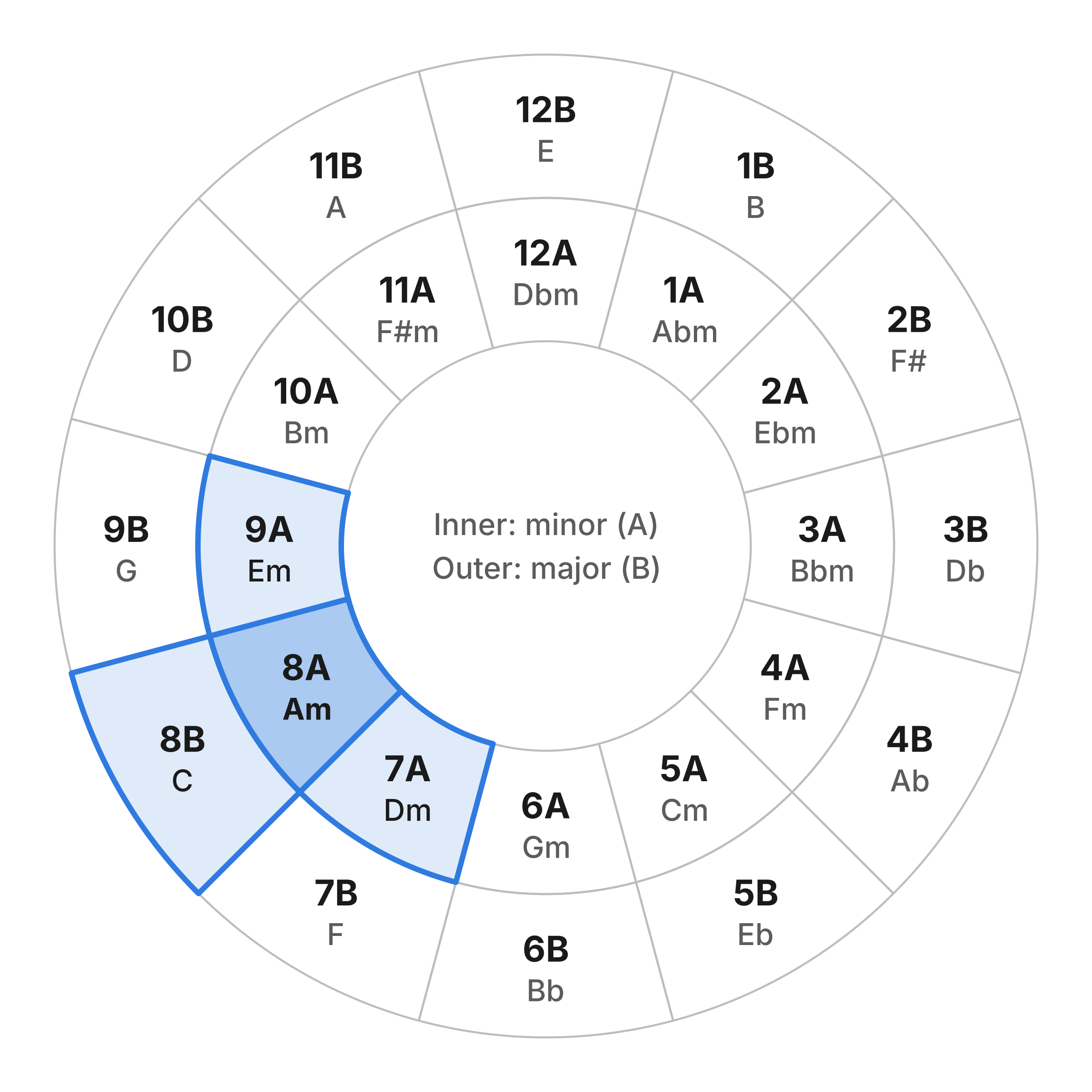
Neighbouring keys share most of their notes, so they blend without clashing. From any key, three moves are safe:
Stay put: the same number and letter is the same key, a perfect match.
One step around: 8A (A minor) to 7A (D minor) or 9A (E minor). These keys differ by just one note.
One ring across: 8A (A minor) to 8B (C major). These relative keys share all seven notes; only the mood changes.
Jumps across the wheel, e.g. going from 8A to 2A, share few notes and will clash unless you're deliberately chasing tension.
For Ableton producers, the wheel helps in three ways. It helps you pick a key that sits well with the tracks yours will be played alongside. It tells you whether a sample or vocal will fit your track. And it lets you shift to a neighbouring key for a breakdown or second section without jarring the listener. Mixed In Key Studio Edition can display detected keys in Camelot notation, so you don't have to convert them yourself.
Fun facts
There are at least 12 different types musical scale. The European / Western one is relatively new (19th century) compared to the Mesopotamian (2,000 BCE). Over time, scales have been redefined by Ancient Greece, China, India, Thailand, Japan, Indonesia, Sub-Saharan Africa, The Middle East, Europe and more. There's even a modern-day movement creating experimental microtonal scales for electronic music.
Indian classical music uses ragas with subtle microtonal inflections, Arabic Maqam uses quarter tones and Indonesian Gamelan uses five and seven-note scales that don't line up with Western notes at all. Live 12's Tuning Systems let you explore alternative and microtonal tunings, but this tutorial sticks to the Western system.
We Hope This Helped
Questions? Feedback? Get in touch...
Join the Shibumi newsletter to get the latest tutorial updates.
Contact us to share your thoughts.