
Ableton’s home for drums
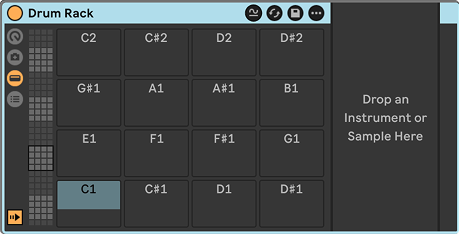
Drum Rack is where most beats in Live begin. It looks like a classic 4×4 grid of pads, but each pad is really a container. It can hold any instrument (a sample in Drum Sampler or Simpler, a Drum Synth, Operator, even a third-party plug-in) plus its own chain of effects. Drop a sample on a pad and it’s ready to play. Drop several on the same pad and they layer into one bigger hit, such as a punchy kick on top of a sub. The grid scrolls through 128 pads, so a single rack can hold a full kit, a sliced breakbeat or a library of one-shots. Choke groups let an open hi-hat be cut by a closed one. Return chains give the whole kit shared reverb and delay. Macro controls tie the most important settings to a few knobs for performance. It’s also where Live’s slicing sends chopped loops. Drum Rack is included in all editions of Live.
Features
4×4 pad grid with access to 128 pads, each mapped to its own MIDI note
Any instrument on any pad: samplers, Drum Synths, synths or plug-ins
Per-pad effects chains for processing each sound individually
Layering of several instruments on a single pad
Choke groups so one sound can cut off another, as with open and closed hi-hats
Return chains for shared send effects such as reverb and delay
Macro controls that map key parameters to a few knobs, with storable variations
Per-pad mixer with volume, pan, sends, mute and solo
Individual outputs so each pad can be routed to its own track
Slice to Drum Rack for turning a loop into a playable kit
Drag-and-drop loading of samples, with Drum Sampler or Simpler as the pad device
Hot-swapping of samples and devices without rebuilding the kit
Great for
Building drum kits
Layered kicks and snares
Sliced breakbeats
Hybrid acoustic and electronic kits
Performing with Push or pad controllers
Related articles
Impulse · Simpler · Sampler · Drum Rack · Drum Buss · Saturator